Backend abstraction & capabilities
VisuAuth's single most important architectural decision is that the UI talks to
backend-agnostic contracts, never to a specific identity system. The
ASP.NET Core Identity adapter, the Microsoft Entra ID adapter, and the
Microsoft Entra External ID adapter all implement the same interfaces defined
in VisuAuth.Abstractions.
That package knows nothing about UserManager, EF Core, or Microsoft Graph —
only DTOs and contracts. Everything backend-specific lives in an adapter.
The contracts
All of these live in VisuAuth.Abstractions. Methods are async and take a
CancellationToken; expected errors come back as a StoreResult
rather than as exceptions.
| Contract | Responsibility |
|---|---|
IUserStore |
Read and mutate users — list/search, get detail, create, update, delete, enable/disable, reset password, reset 2FA, revoke sessions. |
IRoleStore |
The role catalogue and user-role membership — list/get, create/rename/delete, assign/remove. |
IAuthenticationFlow |
End-user auth — password sign-in, register, request/complete password reset, confirm email, sign out. |
IJwtIssuer |
Mint the access token for the mobile / API channel (the Identity adapter ships an HS256 implementation; other adapters may issue different tokens). See Mobile & JWT. |
ITenantStore |
The tenant catalogue, when multi-tenancy is enabled. |
Two more contracts back the optional surfaces: IExternalLoginFlow /
IExternalProviderConfigStore (external OAuth providers) and IAuditReader /
IAdapterConfigStore (audit log and DB-backed adapter configuration).
For example, IUserStore exposes its capability bag plus the operations the
admin UI drives:
public interface IUserStore
{
    UserBackendCapabilities Capabilities { get; }

    Task<UserSummary?> GetAsync(string id, CancellationToken cancellationToken = default);
    Task<UserDetail?> GetDetailAsync(string id, CancellationToken cancellationToken = default);
    Task<PagedResult<UserSummary>> ListAsync(UserFilter filter, CancellationToken cancellationToken = default);
    Task<StoreResult> CreateAsync(CreateUserCommand command, CancellationToken cancellationToken = default);
    Task<StoreResult> UpdateAsync(string id, UpdateUserCommand command, CancellationToken cancellationToken = default);
    Task<StoreResult> DeleteAsync(string id, CancellationToken cancellationToken = default);
    Task<StoreResult> SetEnabledAsync(string id, bool enabled, CancellationToken cancellationToken = default);
    Task<StoreResult> ResetPasswordAsync(string id, CancellationToken cancellationToken = default);
    Task<StoreResult> ResetTwoFactorAsync(string id, CancellationToken cancellationToken = default);
    Task<StoreResult> RevokeSessionsAsync(string id, CancellationToken cancellationToken = default);
}
StoreResult
Mutating operations return a StoreResult — a result-style type for expected
failures (validation, "not found", a backend rule). Exceptions are reserved for
programmer errors and genuinely exceptional conditions.
var result = await userStore.CreateAsync(command);
if (result.IsSuccess)
{
    var id = result.ResourceId;                        // the new user's id
    // Some operations stash extra data, e.g. a generated temporary password:
    if (result.Metadata.TryGetValue("temporaryPassword", out var temp))
    {
        // surface `temp` to the admin once
    }
}
else
{
    var message = result.Error;                        // human-readable summary
    var details = result.ValidationErrors;             // per-field / per-rule
}
IsSuccess— did the operation succeed?ResourceId— id of the affected resource on success (user id, role id, …);nullwhen there's no single resource.Error/ValidationErrors— the failure summary and the granular list (ValidationErrorsis never null — empty when there are none).Metadata— extra payload keyed per operation; never null, empty when there's no payload (so useTryGetValue). The keys are documented on each method (e.g."temporaryPassword").StoreResult.Success(...)/StoreResult.Failure(...)— the factories adapters use.
Capabilities
Backends differ enormously. ASP.NET Core Identity owns its data and supports the
full surface. Microsoft Entra is a cloud IAM where Microsoft hosts the login
flow and many operations are reachable only through Graph. Rather than pretend
otherwise, every store exposes a UserBackendCapabilities bag, and the UI
consults it at runtime to show only the controls a backend can honour.
The contract: an operation a backend does not support throws
NotSupportedExceptionrather than silently succeeding — and the UI hides its control first, so an operator never submits a form that would 500. A new adapter that hasn't reasoned about a feature inherits the safe default (false/ read-only).
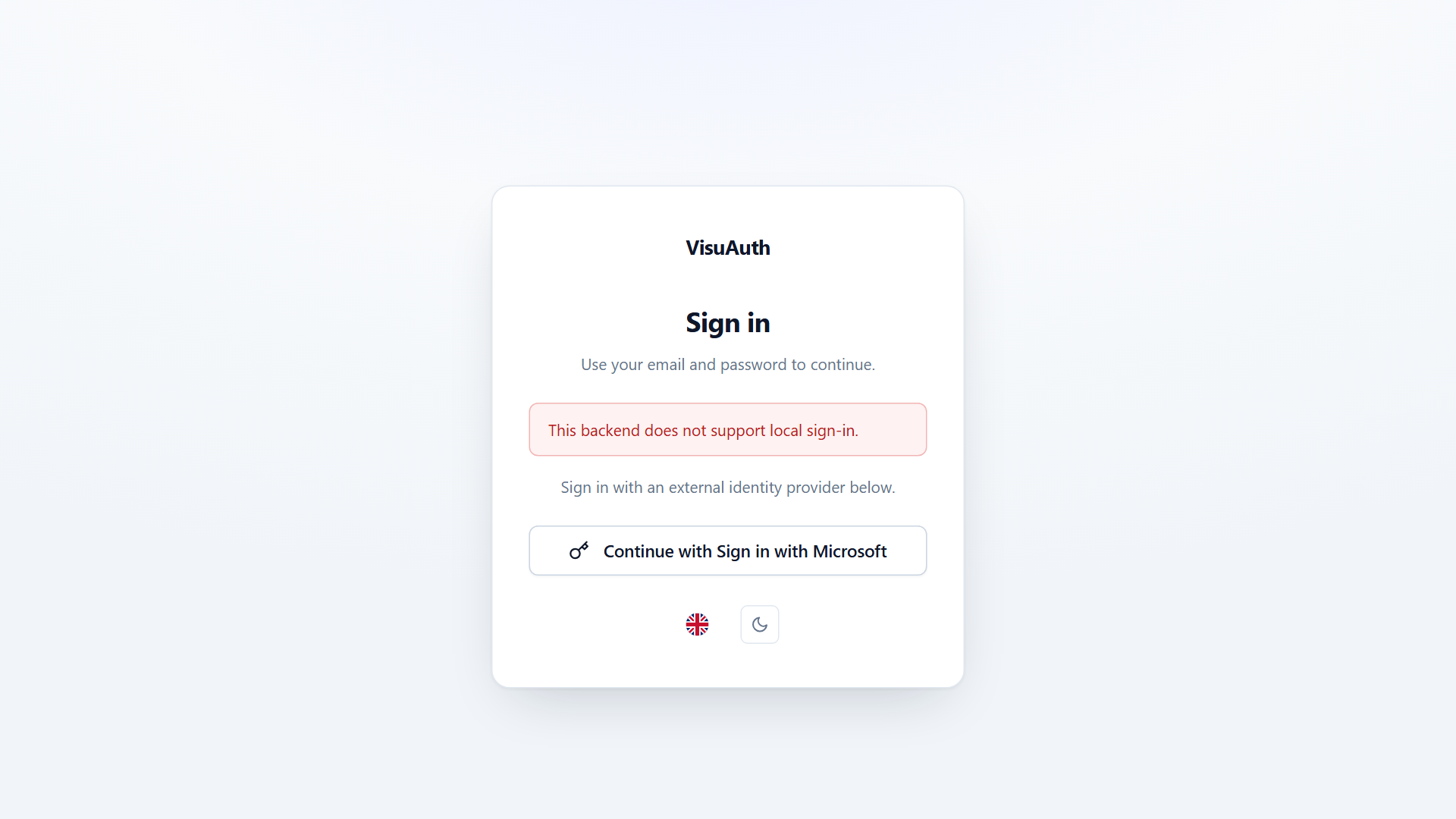
This is what lets the Entra adapter swap the email/password form for a
"Sign in with Microsoft" button automatically — it declares
SupportsLocalLogin = false, and the end-user UI reacts.
The flags
| Flag | What it gates |
|---|---|
SupportsLocalLogin |
The email + password sign-in form. |
SupportsRegistration |
Self-service registration. |
SupportsPasswordReset |
The password-reset flow. |
SupportsTwoFactor |
TOTP setup / challenge / recovery-code pages for end users. |
SupportsTwoFactorReset |
The admin resetting a user's 2FA. |
SupportsImpersonation |
The admin logging in as another user. |
SupportsCustomClaims |
Reading / writing custom claims. |
SupportsRoleManagement |
Listing and assigning roles. |
SupportsRoleMutation |
Creating / renaming / deleting roles at runtime (distinct from assigning — see below). |
SupportsAuditLog |
The audit-log view. |
SupportsBulkOperations |
Mass enable/disable, invite, etc. |
SupportsSessionRevocation |
Force-logout of active sessions. |
SupportsExternalProviders |
Configuring external IdPs (Google, Apple, …). |
SupportsEmailConfirmation |
An explicit email-confirmation step. |
SupportsLockout |
Lockout after failed attempts. |
EmailDomainSuffix |
When set, the admin Create-User form locks the email to a fixed domain (e.g. @contoso.onmicrosoft.com) — used by backends that reject arbitrary domains. null = any domain. |
SupportsRoleManagementvsSupportsRoleMutation. A backend can fully support assigning roles while forbidding defining them at runtime. Microsoft Entra is the canonical case: app roles are declared in the application registration manifest, so the Graph adapters'CreateAsync/RenameAsync/DeleteAsyncthrowNotSupportedException. The admin Roles page hides the create / rename / delete controls whenSupportsRoleMutationisfalse.
Adapter profiles at a glance
| Capability | ASP.NET Identity | Entra ID / External |
|---|---|---|
| Local login | ✅ | ❌ (Microsoft hosts it) |
| Registration / password reset | ✅ | ❌ |
| Role assignment | ✅ | ✅ |
| Role mutation (create/rename/delete) | ✅ | ❌ (manifest-defined) |
| Two-factor reset | ✅ | ✅ |
| Session revocation | ✅ | ✅ |
| External providers | ✅ | — |
EmailDomainSuffix |
null |
set to the verified tenant domain |
Writing your own adapter
- Implement the contracts your scenario needs (
IUserStoreat minimum), in your own package. - Return a
UserBackendCapabilitiesthat honestly describes what works; throwNotSupportedExceptionfrom the operations you don't support. - Register your implementations against the abstractions in DI.
Because the UI only ever depends on the abstractions, it adapts to your backend with no UI changes — the same pattern the built-in Entra adapters use.
Stability.
VisuAuth.Abstractionscarries a v1.0 stability guarantee — see its package README.