Multi-tenancy
VisuAuth serves multiple tenants from a single app and database using a
shared-database, shared-schema model: a TenantId column on the user
entity, an EF Core global query filter on that entity that scopes its
queries to the current tenant, and a SaveChanges interceptor that stamps
TenantId on insert for any tenant-scoped entity.
Multi-tenancy is opt-in. Without it, ITenantContext.IsMultiTenancyEnabled
is false, the query filters are no-ops, and the tenant catalogue page doesn't
render — single-tenant apps pay nothing.
Enabling it
Three things change versus the single-tenant quickstart:
1. Derive your user and DbContext from the multi-tenant base types.
// IdentityUser + IMultiTenantEntity (adds the nullable TenantId column).
public sealed class ApplicationUser : MultiTenantIdentityUser { }

// Applies the global query filter + receives the current tenant context.
public sealed class AppDbContext(
    DbContextOptions<AppDbContext> options,
    ITenantContext tenantContext)
    : MultiTenantIdentityDbContext<ApplicationUser>(options, tenantContext);
2. Opt in when registering VisuAuth, and add the interceptor to the DbContext.
builder.Services.AddVisuAuth()
    .UseAspNetIdentity<ApplicationUser>()
    // The generic overload also wires the tenant catalogue store at
    // /visuauth/admin/tenants.
    .EnableMultiTenant<AppDbContext, ApplicationUser>(options =>
    {
        options.HeaderName = "X-Tenant-Id";   // default
        options.CookieName = "va-tenant";     // default
    })
    .AddAdminUi()
    .AddEndUserUi();

builder.Services.AddDbContext<AppDbContext>((sp, options) =>
{
    options.UseSqlite(builder.Configuration.GetConnectionString("Default"));
    // Stamps TenantId on insert. No-op in single-tenant mode.
    options.AddVisuAuthTenancy(sp);
});
3. Mount the resolver middleware before MapVisuAuth.
Resolving the current tenant
The resolver middleware sets the tenant for each request from TenantOptions,
in this precedence:
- The
tenant_idclaim of a valid bearer token — authoritative. The claim is signed, so for a token-authenticated caller the header and cookie are ignored entirely; a mobile / API client cannot leave its own tenant by sendingX-Tenant-Id. A valid token that carries no tenant resolves to no tenant rather than falling back to the header. - HTTP header (
UseHeader, default on) —X-Tenant-Idby default. Applies only to callers without a valid bearer token. - Cookie (
UseCookie, default on) —va-tenantby default. Set by the admin sidebar tenant switcher for browser flows.
Why the claim wins. The header is client-controlled and unauthenticated; the claim is inside a signed token. Trusting the header for an authenticated API caller would let a user of tenant
acmeoperate inglobexsimply by setting a request header. See the security posture.Operators may switch tenants. The admin dashboard signs in with the Identity cookie, whose principal carries no
tenant_idclaim, so it falls through to the cookie switcher and can reach any tenant — by design. The dashboard itself is gated by theVisuAuth.Adminpolicy; tighten that policy if your operators should not see every tenant.Planned. Subdomain resolution (
UseSubdomain) is reserved inTenantOptionsbut not yet wired.
Set RequireTenant = true to reject requests with no resolvable tenant
(HTTP 400); leave it false (default) to let global / admin paths run with
CurrentTenantId = null.
Anywhere in your app, inspect the ambient tenant via ITenantContext:
public sealed class MyService(ITenantContext tenant)
{
    public void Work()
    {
        if (tenant.IsMultiTenancyEnabled)
        {
            var id = tenant.CurrentTenantId;             // e.g. "acme"
            var name = tenant.CurrentTenantDisplayName;  // when available
        }
    }
}
How isolation works
IMultiTenantEntity(astring? TenantIdmarker) is implemented byMultiTenantIdentityUser. Any entity that implements it is auto-stamped on insert by the interceptor below.- Global query filter (reads) —
MultiTenantIdentityDbContext<TUser>adds an EF Core query filter on the user entity (TUser), so user queries are automatically restricted toITenantContext.CurrentTenantId(and span all tenants when tenancy is off or no tenant is resolved). You never writeWhere(u => u.TenantId == …)by hand for users. To tenant-scope reads of your own additional entities, add your ownHasQueryFilterfor them. TenantSaveChangesInterceptor(writes) — auto-populatesTenantIdon insert for everyIMultiTenantEntity(leaving rows that already carry one alone), so new rows land in the current tenant without app code remembering to set it.
Because user isolation lives in the query filter and write-stamping lives in the interceptor, the rest of VisuAuth (the stores, the admin UI, the end-user pages) is tenant-agnostic — it just sees the already-scoped users.
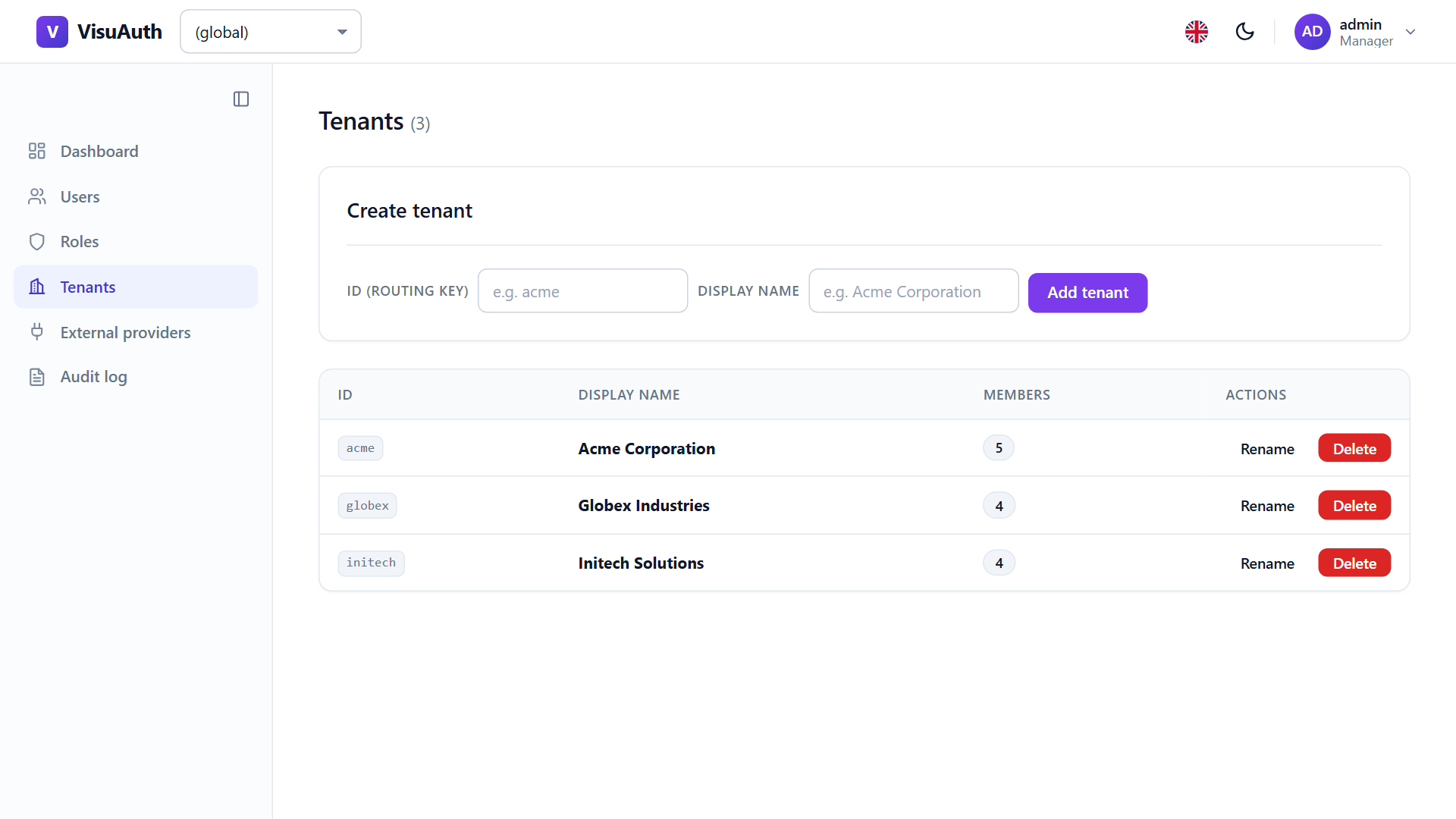
The tenant catalogue
The generic EnableMultiTenant<TDbContext, TUser> overload registers
ITenantStore, backed by a VisuAuthTenants table, and surfaces the catalogue
at /visuauth/admin/tenants — create, rename, and delete tenants inline.
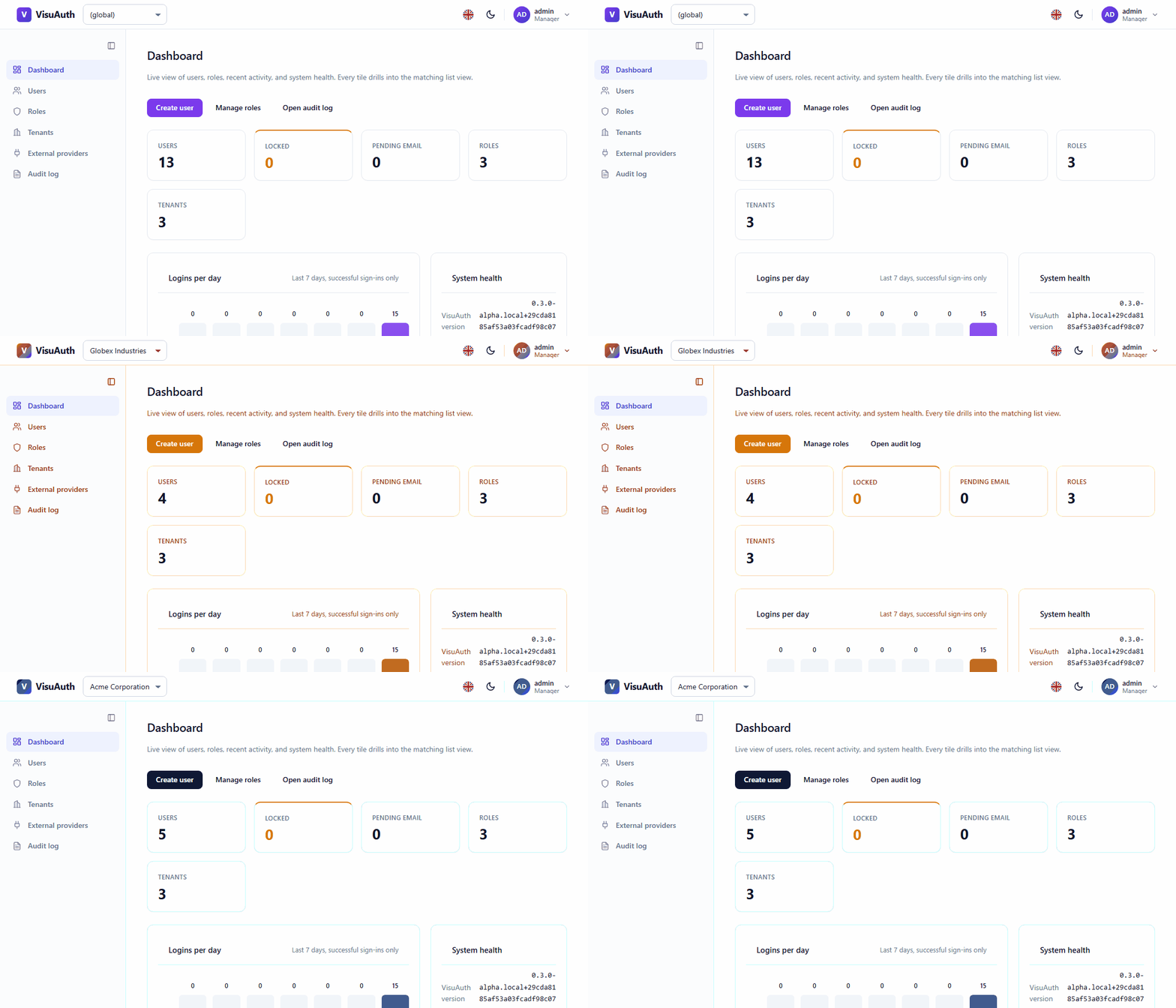
The admin sidebar's tenant switcher writes the va-tenant cookie so an
operator can scope the dashboard to one tenant at a time.
Per-tenant configuration & branding
Once tenancy is on, VisuAuth can vary configuration and appearance per tenant:
- Branding / theming — implement
ITenantThemeResolver(colors, logo) andITenantViewOverrideResolver(per-tenant Razor templates). See Theming (layer 4). - Policy — per-tenant password policy and lockout are resolved through the tenant settings layer.
Adapters. Multi-tenancy as described here is the ASP.NET Core Identity story. For Microsoft Entra adapters the directory itself is the tenant, so this per-user
TenantIdmodel does not apply — see the adapter pages.